


Meta Business Suite
4.681.06K Reviews
App Specs
- Version
- 562.0.0.24.107
- Updated On
- License
- Free
- Downloads
- 100,000,000+
- Developer
- Meta Platforms, Inc.
- Categories
- Business
- Platform
- Android, iOS
Screenshots


 Analysis by AppCompare
If you’re opening Meta Business Suite for the first time, it helps to think of it as a workbench for Facebook and Instagram rather than a replacement for every tool a business might use. I find it most useful when I want to handle routine publishing and customer conversations without bouncing between separate apps. The payoff is practical: fewer context switches, a clearer view of what needs attention, and an easier way to keep a small social presence moving through a busy week.
What to expect from the app
Meta Platforms, Inc. makes this free business app, which is suitable for everyone and has been available since Jan 28, 2014. It has a 4.6 average from around 5.1 million ratings and over 100 million installs, so it is a familiar choice for businesses already using Meta’s platforms. The current version is 555.0.0.50.109. Those figures suggest a widely used product, but they don’t tell you whether its workflow fits your business; that depends on how much of your day is spent managing Facebook and Instagram.
I would start with a modest expectation: this is a convenient place to coordinate social activity, not a full marketing department in your pocket. It can bring together publishing, audience replies, performance information and ad tasks, but you still need to decide what to say, who should respond, and what results matter to you. For a shop, service provider or community organization that maintains both platforms, that central view can save real time. If your work happens mainly on other social networks, the advantage shrinks quickly.
The key first question is whether the accounts you need to manage are already organized for business use. The app is built around business activity on Meta’s services, so it makes the most sense when you have the relevant Facebook and Instagram presence ready to connect and access. I’d gather the account details and make sure you can sign in with the appropriate access before trying to plan a full week of posts. That simple preparation can prevent a confusing first session spent wondering why a page or account is not appearing.
Getting set up without overcomplicating it
Once you’re in, take a moment to check which business presence is selected before creating anything. This is an easy detail to overlook if you help with more than one page or account. I’d also look at the available publishing and inbox areas first, then leave more involved decisions—like ad changes—until you know where the essential controls are. A calm, short tour is more useful than trying every feature at once.
For your first post, choose something straightforward that makes sense on both platforms, such as a clear update about opening hours, a new item, or an upcoming appointment window. Review how the content will appear before publishing, and be deliberate about whether it belongs on both Facebook and Instagram. The two audiences may overlap, but their expectations and the way a post reads can differ. Treating cross-posting as a time-saver rather than an automatic answer helps avoid sending a message that feels out of place.
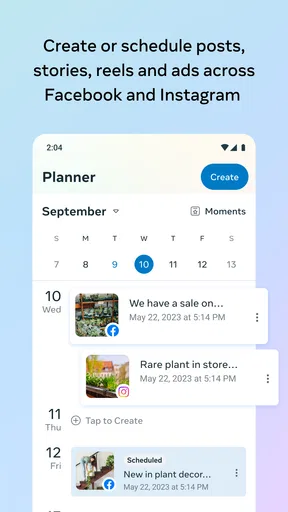
Scheduling is especially handy when you already know what you want to share but don’t want publishing to interrupt customer-facing work. I’d prepare a small set of useful posts, schedule them, and then leave room to respond to what happens that day. A schedule should create breathing space, not lock you into content that becomes irrelevant. If a promotion changes or an announcement is no longer timely, revisit the plan rather than assuming a queued post will still make sense.
Worth Reading Before You Choose

EA SPORTS FC Mobile 26 Is a Bigger Football Game, but It Takes Time

Flipboard Shows What News Apps Must Do Beyond the Feed

Switching to Android Auto Means Rethinking Your Driving Routine

Google Calendar Makes a Crowded Week Easier to Manage

Ludo King Makes the Most of the Minutes Between Plans

Baby Panda World Brings Quick Play to Modern Phones, but Its Game Library Feels Busy
The first useful routine: publish, then listen
A good first success is not a complicated campaign. It is publishing one helpful update and then returning to see whether people respond. Check comments and messages in the combined inbox, answer the questions you can resolve, and note anything that needs a more personal follow-up. This makes the app useful as a daily work tool, not just a place to send posts out and hope for the best.
For example, imagine you run a local repair service and post a simple note explaining how customers can request an appointment. Later, you can use the inbox to spot a question about availability, reply while the details are fresh, and keep track of other messages that need attention. That is a more grounded test than judging the app by how many features it contains. If the routine saves you from missing an enquiry, it has already earned its place in your day.
When you review performance, focus on one practical question at a time. Did people react to the announcement? Did it prompt the kind of conversation you wanted? Which post seems worth repeating in a different form? The insights can help you notice patterns, but they do not decide what success means for your business. A post with broad reach may be less useful than a smaller response from people who are actually likely to become customers.
Where the workflow can feel less smooth
Centralizing messages is convenient, but it can also make an inbox feel like a shared queue that still needs human judgment. A quick reply is not always the right reply, especially when a customer is upset, a request involves private details, or the answer depends on someone else in the business. I’d use the combined view to notice and organize conversations, while keeping sensitive or complicated matters on a channel that suits them better.
It also helps to separate routine social work from specialist tasks. If you need detailed planning across many different networks, a dedicated social media management service may offer a better fit. If your main job is designing polished creative, a design app will be more comfortable for that work. And if you need to make careful, in-depth advertising decisions, a larger screen and a more focused working session may be preferable to making changes on a phone between appointments. Meta Business Suite is strongest when the task belongs to its own Facebook-and-Instagram workflow.
My practical tip is to build a small repeatable check-in: review the selected account, look for unanswered messages, check what is due to publish, and then glance at recent performance. That sequence catches common oversights without turning social media into a constant interruption. Notifications can help you notice activity, but I would still choose a deliberate time to review the inbox; otherwise, frequent alerts can fragment the day even when each one seems useful on its own.
How it compares with other ways of working
Compared with managing Facebook and Instagram separately, the app’s main advantage is having several everyday tasks together. That is particularly helpful for an owner who writes posts, handles customer questions and checks basic performance personally. The trade-off is that a unified workflow is most valuable inside Meta’s ecosystem. Someone who needs one publishing calendar for a broader mix of social networks may be better served by a cross-platform service, even if that means giving up some of the directness of Meta’s own tools.
It is also different from relying on the regular Facebook or Instagram apps alone. Those apps are natural places to browse and interact as an individual, while a business workflow benefits from keeping publishing, messages and page performance in view together. I would not install a separate management tool just because it has more menus; I would choose one only when a specific gap matters, such as coordinating other networks or collaborating through a more specialized process.
Streamlined Social Media Management
First things first, Meta Business Suite is all about efficiency. You know that feeling when you’re trying to post on Facebook and Instagram but have to switch apps constantly? Well, this app solves that headache. With a single dashboard, you can manage both platforms seamlessly. It’s like having a personal assistant who never gets tired.
The interface is pretty intuitive. Even if you’re not a tech whiz, you’ll find it easy to navigate. Posting across platforms is as simple as clicking a few buttons, and you can even schedule posts in advance. This feature is a lifesaver for those of us who like to plan and avoid last-minute scrambling.
Engage with Your Audience
Engagement is key in the social media world, and the app doesn’t disappoint. You can keep track of comments and messages from both Facebook and Instagram in one place. No more missing crucial comments from your followers because you were too busy toggling between apps.
One thing I really appreciate is the notification system. It’s smart enough to alert you only about the stuff that matters, so you’re not constantly bombarded with unnecessary pings. Plus, responding to messages is straightforward and efficient, making customer interaction a breeze.
Insights and Analytics
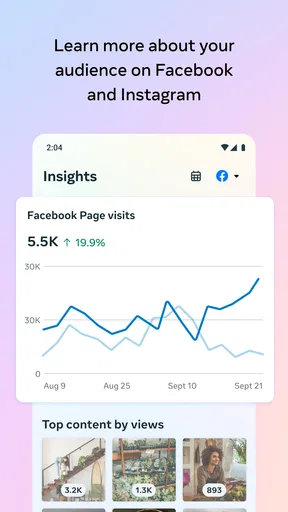
Now, let’s talk numbers. If you’re like me and love digging into data to see what’s working and what’s not, Meta Business Suite has you covered. The app offers detailed insights into your posts’ performance. You can track engagement rates, reach, and even see which posts are driving the most action.
These analytics are not just a bunch of numbers; they’re actionable insights. You can use this data to tweak your strategies and optimize your content. It’s like having a mini-marketing team analyzing your every move.
Ad Management Made Easy
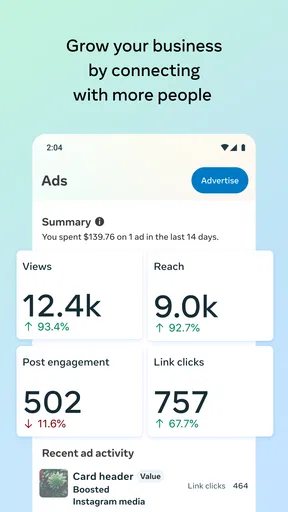
Running ads can be tricky, but with this app, it’s pretty straightforward. You can create, manage, and track your ad campaigns without breaking a sweat. The app provides a comprehensive overview of how your ads are performing, helping you make informed decisions about where to invest your budget.
The ability to adjust your campaigns on the go is a huge plus. Whether you’re at your desk or on the move, you can tweak your ads to get the best results. This flexibility is a game-changer for businesses of all sizes.
User Experience and Accessibility
Let’s not forget about the overall user experience. The app is designed with the user in mind, making it accessible and easy to use. It’s available on both Android and iOS, so you can manage your accounts from anywhere. The design is clean and modern, which makes navigation a breeze.
For those who need a little help getting started, there are plenty of resources available. From tutorials to FAQs, you’ll find a wealth of information to guide you through the features. It’s like having a support team at your fingertips.
In conclusion, Meta Business Suite is a robust tool that can significantly streamline your social media management tasks. Whether you’re a small business owner or managing a large brand, this app has something to offer. It’s efficient, user-friendly, and packed with features that can help take your social media game to the next level. Give it a try, and you might just wonder how you ever managed without it!
Pros
- User-friendly interface for easy navigation.
- Integration with Facebook and Instagram.
- Detailed analytics for performance tracking.
- Allows scheduling posts in advance.
- Centralized inbox for managing messages.
Cons
- Limited features in the mobile app.
- Requires stable internet for optimal use.
- Notifications can be overwhelming.
- Occasional syncing issues with accounts.
- Some advanced features need improvement.
FAQs for Meta Business Suite
What is Meta Business Suite and what are its main features?
Meta Business Suite is a comprehensive tool designed for businesses to manage their presence on Facebook and Instagram. It offers features like scheduling posts, tracking insights, and managing messages and notifications across both platforms. Users can also create ads and monitor performance, making it a one-stop solution for social media management.
Is Meta Business Suite free to use, or are there any costs involved?
Meta Business Suite is free to use for managing your business accounts on Facebook and Instagram. However, if you choose to run ads, there will be associated costs based on your advertising budget. The suite itself allows you to monitor and manage without any charges.
Can I use Meta Business Suite for multiple business pages?
Yes, Meta Business Suite supports managing multiple business pages. This feature is particularly useful for social media managers or business owners with multiple brands. You can switch between different pages seamlessly and manage content and analytics from a unified dashboard.
What devices and operating systems is Meta Business Suite compatible with?
Meta Business Suite is available as an app for both Android and iOS devices. Additionally, it can be accessed via a web browser on any desktop or laptop, making it versatile and accessible from virtually any device with an internet connection.
How does Meta Business Suite help in tracking business performance?
Meta Business Suite provides detailed analytics and insights on post engagement, reach, and audience demographics. Users can track the performance of both organic and paid content, helping to refine strategies and improve overall social media effectiveness. The insights are presented in an easy-to-understand format, aiding in better decision-making.


